
+++*

Symbolic Forest

A homage to loading screens.

Blog : Post Category : Technology : Page 3

We can rebuild it! We have the technology! (part one)

Or, how many different ways can you host a website?

I said the other day I’d write something about how I rebuilt the site, what choices I made and what coding was involved. I’ve a feeling this might end up stretched into a couple of posts or so, concentrating on different areas. We’ll start, though, by talking about the tech I used to redevelop the site with, and, indeed, how websites tend to be structured in general.

Back in the early days of the web, 25 or 30 years ago now, to create a website you wrote all your code into files and pushed it up to a web server. When a user went to the site, the server would send them exactly the files you’d written, and their browser would display them. The server didn’t do very much at all, and nor did the browser, but sites like this were a pain to maintain. If you look at this website, aside from the text in the middle you’re actually reading, there’s an awful lot of stuff which is the same on every page. We’ve got the header at the top and the sidebar down below (or over on the right, if you’re reading this on a desktop PC). Moreover, look at how we show the number of posts I’ve written each month, or the number in each category. One new post means every single page has to be updated with the new count. Websites from the early days of the web didn’t have that sort of feature, because they would have been ridiculous to maintain.

The previous version of this site used Wordpress, technology from the next generation onward. With Wordpress, the site’s files contain a whole load of code that’s actually run by the web server itself: most of it written by the Wordpress developers, some of it written by the site developer. The code contains templates that control how each kind of page on the site should look; the content itself sits in a database. Whenever someone loads a page from the website, the web server runs the code for that template; the code finds the right content in the database, merges the content into the template, and sends it back to the user. This is the way that most Content Management Systems (CMSes) work, and is really good if you want your site to include features that are dynamically-generated and potentially different on every request, like a “search this site” function. However, it means your webserver is doing much more work than if it’s just serving up static and unchanging files. Your database is doing a lot of work, too, potentially. Databases are seen as a bit of an arcane art by a lot of software developers; they tend to be a bit of a specialism in their own right, because they can be quite unintuitive to get the best performance from. The more sophisticated your database server is, the harder it is to tune it to get the best performance from it, because how the database is searching for your data tends to be unintuitive and opaque. This is a topic that deserves an essay in its own right; all you really need to know right now is that database code can have very different performance characteristics when run against different sizes of dataset, not just because the data is bigger, but because the database itself will decide to crack the problem in an entirely different way. Real-world corporate database tuning is a full-time job; at the other end of the scale, you are liable to find that as your Wordpress blog gets bigger as you add more posts to it, you suddenly pass a point where pages from your website become horribly slow to load, and unless you know how to tune the database manually yourself you’re not going to be able to do much about it.

I said that’s how most CMSes work, but it doesn’t have to be that way. If you’ve tried blogging yourself you might have heard of the Movable Type blogging platform. This can generate each page on request like Wordpress does, but in its original incarnation it didn’t support that. The software ran on the webserver like Wordpress does, but it wasn’t needed when a user viewed the website. Instead, whenever the blogger added a new post to the site, or edited an existing post, the Movable Type software would run and generate all of the possible pages that were available so they could be served as static pages. This takes a few minutes to do each time, but that’s a one-off cost that isn’t particularly important, whereas serving pages to users becomes very fast. Where this architecture falls down is if that costly regeneration process can be triggered by some sort of end-user action. If your site allows comments, and you put something comment-dependent into the on-every-page parts of your template - the number of comments received next to links to recent posts, for example - then only small changes in the behaviour of your end-users hugely increase the load on your site. I understand Movable Type does now support dynamically-generated pages as well, but I haven’t played with it for many years so can’t tell you how the two different architectures are integrated together.

Nowadays most heavily-used sites, including blogs, have moved towards what I supposed you could call a third generation of architectural style, which offloads the majority of the computing and rendering work onto the user’s browser. The code is largely written using JavaScript frameworks such as Facebook’s React, and on the server side you have a number of simple “microservices” each carefully tuned to do a specific task, often a particular database query. Your web browser will effectively download the template and run the template on your computer (or phone), calling back to the microservices to load each chunk of information. If I wrote this site using that sort of architecture, for example, you’d probably have separate microservice calls to load the list of posts to show, the post content (maybe one call, maybe one per post), the list of category links, the list of month links, the list of popular tags and the list of links to other sites. The template files themselves have gone full-circle: they’re statically-hosted files and the webserver sends them back just as they are. This is a really good system for busy, high-traffic sites. It will be how your bank’s website works, for example, or Facebook, Twitter and so on, because it’s much more straightforward to efficiently scale a site designed this way to process high levels of traffic. Industrial-strength hosting systems, like Amazon Web Services or Microsoft Azure, have moved in ways to make this architecture very efficiently hostable, too. On the downside, your device has to download a relatively large framework library, and run its code itself. It also then has to make a number of round-trips to the back-end microservices, which can take some time on a high-latency connection. This is why sometimes a website will start loading, but then you’ll just have the website’s own spinning wait icon in the middle of the screen.

Do I need something quite so heavily-engineered for this site? Probably not. It’s not as if this site is intended to be some kind of engineering portfolio; it’s also unlikely ever to get a huge amount of traffic. With any software project, one of the most important things to do to ensure success is to make sure you don’t get distracted from what your requirements actually are. The requirements for this site are, in no real order, to be cheap to run, easy to update, and fun for me to work on; which also implies I need to be able to just sit back and write, rather than spend long periods of time working on site administration or fighting with the sort of in-browser editor used by most CMS systems. Additionally, because this site does occasionally still get traffic to some of the posts I wrote years ago, if possible I want to make sure posts retain the same URLs as they did with Wordpress.

With all that in mind, I’ve gone for a “static site generator”. This architecture works in pretty much the same way as the older versions of Movable Type I described earlier, except that none of the code runs on the server. Instead, all the code is stored on my computer (well, I store it in source control, which is maybe a topic we’ll come back to at another time) and I run it on my computer, whenever I want to make a change to the site. That generates a folder full of files, and those files then all get uploaded to the server, just as if it was still 1995, except nowadays I can write myself a tool to automate it. This gives me a site that is hopefully blink-and-you’ll-miss-it fast for you to load (partly because I didn’t incorporate much code that runs on your machine), that I have full control over, and that can be hosted very cheaply.

There are a few static site generators you can choose from if you decide to go down this architectural path, assuming you don’t want to completely roll your own. The market leader is probably Gatsby, although it has recently had some well-publicised problems in its attempt to repeat Wordpress’s success in pivoting from being a code firm to a hosting firm. Other popular examples are Jekyll and Eleventy. I decided to go with a slightly less-fashionable but very flexible option, Wintersmith. It’s not as widely-used as the others, but it is very small and slim and easily extensible, which for me means that it’s more fun to play with and adapt, to tweak to get exactly the results I want rather than being forced into a path by what the software can do. As I said above, if you want your project to be successful, don’t be distracted away from what your requirements originally were.

The downside to Wintersmith, for me, is that it’s written in CoffeeScript, a language I don’t know particularly well. However, CoffeeScript code is arguably just a different syntax for writing JavaScript,* which I do know, so I realised at the start that if I did want to write new code, I could just do it in JavaScript anyway. If I familiarised myself with CoffeeScript along the way, so much the better. We’ll get into how I did that; how I built this site and wrote my own plugins for Wintersmith to do it, in the next part of this post.

*The next part of this post, in which we discuss how to get Wintersmith to reproduce some of the features of Wordpress, is here*

* This sort of distinction—is this a different language or is this just a dialect—is the sort of thing which causes controversies in software development almost as much as it does in the natural languages. However, CoffeeScript’s official website tries to avoid controversy by taking a clear line on this: “The golden rule of CoffeeScript is: ‘it’s just JavaScript’”.
Inconsistency

In which different tools behave in different ways

One of those days when everything seemed to go wrong at work this afternoon. Partly because of things I broke, partly because of things that other people had messed up before I got there, partly because of things that seemed to go wrong entirely by themselves.

For example - warning, dull technical paragraph ahead - I hadn’t realised that Visual Studio can cope remarkably well with slightly-corrupt solution files and will happily skip over and ignore the errors; but other tools such as MSBuild will throw the whole file out, curl up and cry into their beer. Visual Studio, whilst ignoring the error, also won’t fix it. Therefore, when git is a git and accidentally corrupts a solution file in a merge, you will have no problems at all on a local build, but mysterious and hard-to-fix total failures happen whenever you try to build on the build server.

Update, September 8th 2020: At some point I will write a proper blog post about what happened here, how to spot it is going to happen, and how to fix it, because although MSBuild is going away now we are in the .NET Core world there are still plenty of people out there using .NET Framework, and they still occasionally face this problem.

Disassembly, Reassembly

In which we try to use metaphor

The past two days at work have largely just been the long slog of writing unit tests for a part of the system which firstly, was one of the hairiest and oldest parts of the system; and secondly, I’ve just rewritten from scratch. In its non-rewritten form it was almost entirely impossible to test, due to its reliance on static code without any sort of injection.

For non-coding people for whom this is all so much “mwah mwah mwah” like the adults in Peanuts: a few weeks ago I was doing some interesting work, to whit, dismantling a creaking horror, putting its parts side by side on the workbench, scraping off the rust and muck and polishing them up, before assembling the important bits back together into a smoother, leaner contraption and throwing away all the spare screws, unidentifiable rusted-up chunks and other bits that didn’t seem to do anything. Now, though, I have the job of going through each of the newly-polished parts of the machine and creating tools to prove that they do what I think they were originally supposed to do. As the old machine was so gummed-up and tangled with spiderwebs and scrags of twine, it was impossible to try to do this before, because trying to poke one part would have, in best Heath Robinson style, accidentally tugged on the next bit and pushed something else that was supposed to be unconnected, setting off a ball rolling down a ramp to trip a lever and drop a counterweight to hit me on the head in the classic slapstick manner. All this testing each aspect of the behaviour of each part of the device is, clearly, a very important task to do, but it’s also a very dull job. Which is why an awful lot of coders don’t like to do it properly, or use it as a “hiding away” job to avoid doing harder work.

Nevertheless, today it did lead me to find one of those bugs which is so ridiculous it made me laugh, so ridiculous that you have a “it can’t really be meant to work like that?” moment and have to dance around the room slightly. I confirmed with the team business analyst that no, the system definitely shouldn’t behave the way the code appeared to. I asked the team maths analyst what he thought, and he said, “actually, that might explain a few things.”

Repetition

In which we get annoyed with AWS

The problem with writing a diary entry every day is that most weeks of the year, five days out of seven are work. It’s hard to write about work and make it interesting and different every day; and also not write about anything too confidential.

Writing about work itself would quickly become pretty dull, I fear, however interesting I tried to make it. Today, I wrestled with the Amazon anaconda. Amazon have a product called Elastic Beanstalk, which is a bit like a mini virtual data centre for a single website. You pick a virtual image for your servers, you upload a zip file with your website in it, and it fires up as many virtual servers as you like, balances the load between them, fires up new servers when load is high and shuts down spare ones when load is low. If you’re not careful it’s a good way to let people DDoS your credit card, because you pay for servers by the hour, but all-in-all it works quite well. The settings are simple, but deliberately fairly straightforward: how powerful a server do you want to run on, how many of them do you need at different times of the day, and a few other more esoteric and technical knobs to tweak. Elastic Beanstalk isn’t so much a product in itself, as a wrapper around lots of other Amazon Web Services products that you can use separately: virtual servers, server auto-scaling and inbound load balancing. The whole idea is to make tying those things together in a typical use-case a really easy thing to do, rather than having to roll your own each time and struggling with the hard bits. The only thing that’s specifically Elastic Beanstalk is the control panel and configuration on top of it, which keeps track of what you want installed on your Elastic Beanstalk application and controls all the settings of the individual components. You can still access the individual components too, if you want to, and you can even change their settings directly, but doing so is usually a Bad Idea as then the Elastic Beanstalk control layer will potentially get very confused.

Today, I found I couldn’t update one of our applications. A problem with an invalid configuration. Damn. So I went to fix the configuration - but it was invalid. So I couldn’t open it, to fix it. It was broken, but I couldn’t fix it because it was broken. Oh.

That’s how exciting work is. One line of work held up, whilst I speak to Ops, get the broken Elastic Beanstalk replaced from scratch with a working one. In theory I could have done it myself, but our Ops chap doesn’t really like his part of the world infringed unilaterally.

The woman at the desk opposite me is on a January diet. One of those diets that involves special milkshakes and lots of water all day. Personally, I’d rather have real food.

Curious problem

In which we have an obscure font problem, in annoyingly specific circumstances

Only a day after the new garden blog went live, I found myself with a problem. This morning, I noticed a problem with it, on K’s PC. Moreover, it was only a problem on K’s PC. On her PC, in Firefox and in IE, the heading font was hugely oversized compared to the rest of the page. In Chrome, everything was fine.

Now, I’d tested the site in all of my browsers. On my Windows PC, running Window 7 just like K’s, there were no problems in any of the browsers I’d tried. On my Linux box, all fine; on my FreeBSD box, all fine. But on K’s PC, apart from in Chrome, the heading font was completely out. Whether I tried setting an absolute size or a relative size, the heading font was completely out.

All of the fonts on the new site are loaded through the Google Webfonts API, because it’s nice and simple and practically no different to self-hosting your fonts. Fiddling around with it, I noticed something strange: it wasn’t just a problem specific to K’s PC, it was a problem specific to this specific font. Changing the font to anything else: no problems at all. With the font I originally chose: completely the wrong size on the one PC. Bizarre.

After spending a few hours getting more and more puzzled and frustrated, I decided that, to be frank, I wasn’t that attached to the specific font. So, from day 2, the garden blog is using a different font on its masthead. The old one – for reference, “Love Ya Like A Sister” by Kimberly Geswein – was abandoned, rather than wrestle with getting it to render at the right size on every computer out there. The replacement – “Cabin Sketch” by Pablo Impallari – does that reliably, as far as I’ve noticed;* and although it’s different it fits in just as well.

* this is where someone writes in and says it looks wrong on their Acorn Archimedes, or something along those lines.

Hello, Operator

In which we consider switching OS

Right, that’s enough of politics. For now, at least, until something else pops up and ires me.

Back onto even shakier ground, so far as quasi-religious strength of feeling goes. I’m having doubts. About my operating system.

Back in about 1998 or so, I installed Linux on my PC. There was one big reason behind it: Microsoft Word 97. Word 97, as far as I can remember it, was a horribly bug-ridden release; in particular, when you printed out a long document, it would skip random pages. I was due to write a 12,000 word dissertation, with long appendices and bibliography,* and I didn’t trust Word to do it. I’d had a flatmate who had tackled the same problem using Linux and LaTeX, so I went down the same route. Once it was all set up, and I’d written a LaTeX template to handle the university’s dissertation- and bibliography-formatting rules, everything went smoothly. And I’ve been a happy Linux user ever since.

Now, I’m not going to move away from Linux. I like Linux, I like the level of control it gives me over the PC, and the only Windows-only programs I use run happily under Wine. What I’m not sure about, though, is the precise flavour of Linux I use.

For most of the past decade, I’ve used Gentoo Linux. I picked up on it about a year after it first appeared, and liked what I saw: it gives the system’s installer a huge amount of control over what software gets installed and how it’s configured. It does this in a slightly brutal way, by building a program’s binaries from scratch when it’s installed; but that makes it very easy to install a minimal system, or a specialist system, or a system with exactly the applications, subsystems and dependancies that you want.

There are two big downsides to this. Firstly, it makes installs and updates rather slow; on my 4-year-old computer, it can take a few hours to grind through an install of Gnome or X. Secondly, although the developers do their best, there’s no way to check the stability of absolutely every possible Gentoo installation out there, and quite frequently, when a new update is released, something will break.**

I’m getting a bit bored of the number of times in the last few months that I’ve done a big update, then find that something is broken. Sometimes, that something major is broken; only being able to log in via SSH, for example, because X can’t see my keyboard any more.*** It can be something as simple as a single application being broken, because something it depends on has changed. It turns “checking for updates” into a bit of a tedious multi-step process. I do like using Gentoo, but I’m wondering if life would be easier if I switched over to Ubuntu, or Debian, or some other precompiled Linux that didn’t have Gentoo’s dependancy problems.

So: should I change or should I go stay? Can I be bothered to do a full reinstall of everything? What, essentially, would I gain, that wouldn’t be gained from any nice, clean newly-installed computer? And is it worth losing the capacity to endlessly tinker that Gentoo gives you? I’m going to have to have a ponder.

UPDATE: thanks to K for pointing out that the original closing “should I change or should I go?” doesn’t really make much sense as a contrast.

* The appendices took up the majority of the page count, in the end, because of the number of illustrations and diagrams they contained.

** Before any Gentoo-lovers write in: yes, I am using stable packages, and I do read the news items every time I run “emerge –sync”

*** I was lucky there that SSH was turned on, in fact; otherwise I’d have had to start up and break into the boot sequence before GDM was started.

Performance

In which things turn to treacle

I’ve noticed, over the past few months or so, that sometimes this site seems to load rather slowly. The slow periods didn’t seem to match any spikes in my own traffic, though, so I didn’t see that there was necessarily much I could do about it; moreover, as it wasn’t this site’s traffic that seemed to be causing the problem, I wasn’t under any obligation to do anything about it.

As I’ve mentioned before, a few months back I switched to Google Analytics for my statistics-tracking. Which is all well and good; it has a lot more features than I had available previously. Its only limitation is: it uses cookies and Javascript to do its work. Because of that, it only logs visits by real people, using real browsers,* and not spiders, robots, RSS readers or nasty cracking attempts. Often, especially if you’re a marketing person, that’s exactly what you want. If you’re into the geekery, though, it can cover up what’s exactly going on, traffic-wise, at the server level.

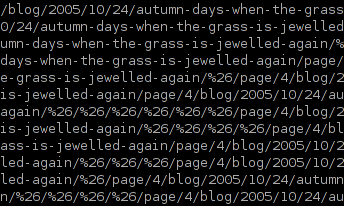
Searching my logs, rather than looking at the Google statistics, showed that I was getting huge numbers of hits for very long URLs, consisting of valid paths joined together by lots of directories named ‘&’:

Logfile extract

That’s a screenshot of a single request in the logfile – the whole thing being about 850 characters long. ‘%26′ is an encoded ‘&’ character. Because of the way WordPress works, these things are valid URLs, and requests for them were coming in at a pretty fast rate. Before long, the request rate was faster than the page generation time – and that’s when the problem really starts to build up, because from there things snowball until nobody gets served.

All these requests were coming from a single IP address, an ordinary consumer type of address in Italy.** Moreover, the user-agent was being disguised. Each hit was coming in from the same IP address, but with a different-but-plausible-looking user-agent string, so the hits looked like a normal, ordinary browser with a real person behind it.

The problem was solved fairly easily, to be honest; and the site was soon behaving itself again. It should still be behaving itself now. But if you came here yesterday afternoon and thought the site didn’t seem to be working very well, that’s why it was. I’m going to have to keep an eye on things, to see if it starts happening again.

* and only if they have Javascript enabled, at that, although I know that covers 99% of the known world nowadays.

** which made me think to myself: “I know I’ve pissed people off … but none of them are Italian!

Brokenness

In which things go wrong in hard-to-diagnose ways

We go away for the weekend. We come back. And the house is cold. Turn on the hot water tap: freezing. The boiler has given up the ghost.

I turn on the PC this morning: and that refuses to come on, too. Which, to be honest, is a recurrence of a problem I was already aware of. Sometimes, on start up, it gets partway and loses contact with the disk drive. Or, sometimes, if you ask it to do too much disk-thrashing just after booting, the same thing happens. On the other hand, if it starts up all its services and is fine for 15 minutes, it will probably stay fine until it’s switched off.

All that points to something like a loose contact somewhere, if you ask me. As I say, it’s been happening for months now; but today I was in the mood to sort it. The computer now has a new hard disk cable. It booted up first time, and it’s still running. Let’s see if it still works in the morning.

The boiler might be suffering from something similar. The gas engineer came out, poked around at it, and fixed it. The chap wasn’t sure what the problem was, or how he fixed it, but fix it he did. Maybe. It’s working now, but we still have to see if that, too, will come on again come tomorrow.

The size of things

In which we measure monitors

The redesign is now almost done, which means that soon you’ll be saved from more posts on the minutiae of my redesign. It’s got me thinking, though: to what extent do I need to think about readers’ technology?

When this blog first started, I didn’t really worry about making it accessible to all,* or about making sure that the display was resolution-independent. It worked for me, which was enough. Over time, screens have become bigger; and, more importantly, more configurable, so I’ve worried less and less about it. When it came to do a redesign, though, I started to wonder. What browsers do my readers actually used.

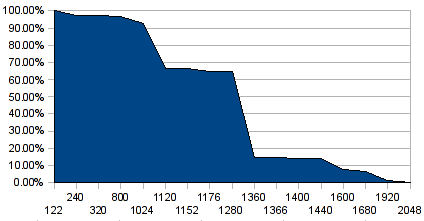
Just after Christmas, for entirely different reasons, I signed up for Google Analytics, rather than do my own statistics-counting as I had been doing. Because Google Analytics relies on JavaScript to do its dirty work, it gives me rather more information about such things than the old log-based system did. So, last week, I spent an hour or so with my Analytics results and a spreadsheet. Here’s the graph I came up with:

Browser horizontal resolutions, cumulative %

The X-axis there is the horizontal width of everyone’s screens, in order but not to scale; the Y-axis is the cumulative percentage of visits.** In other words, the percentage figure for a given width tells you the proportion of visits from people whose screen was that size, or wider.

Straight away, really, I got the answer I wanted. 93% of visits are to this site are from people whose screens are 1024 pixels wide, or more. It’s 95% if I take out the phone-based browsers at the very low end, because I suspect most of that is accounted for by K reading it on the bus on her way home from work. The next step up, though, the graph plunges to only 2/3 of visits. 1024 pixels is the smallest screen width that my visitors use heavily.

Admittedly there’s a bit of self-selection in there, based on the current design; it looks horrible at 800 pixels, and nearly everyone still using an 800×600 screen has only visited once in the two-month sample period. However, that applies to most of the people who visit this site in any case; just more so for the 800-pixel users. Something like 70% of visits are from people who have probably only visited once in the past couple of months; so it’s fair to assume that my results aren’t too heavily skewed by the usability of the current design. It will be interesting to see how much things change.

I’m testing the new design in the still-popular 1024×768 resolution, to make sure everything will still work. I’ll probably test it out a fair bit on K’s phone, too. But, this is a personal site. If you don’t read it, it’s not vital, to you or to me. If I don’t test it on 800×600 browsers, the world won’t end. The statistics, though, have shown me where exactly a cutoff point might be worthwhile.

* For example, in the code of the old design, all that sidebar stuff over on the right comes in the code before this bit with the content, which does (I assume) make it a bit of a bugger for blind readers. That, at least, will be sorted out in the new design.

** “visits” is of course a bit of a nebulous term, but that is a rant for another day.

The Unconnected

In which we bear bad news

Breaking bad news to people is always hard to do. Even if it’s something as mundane as a dead computer. I took a quick look at a machine one of the staff had brought in from home, in my lunch break; it’s vitally important she gets it working again, apparently, because it’s got all her daughter’s schoolwork on it, and they have to have a computer now to do all their assignments on.* It only needed a quick look to show that it’s not coming back to life. Its hard disk is almost certainly now a former hard disk, with no hope of getting her homework back.** But how do I tell her?

Latest addition to my RSS reader: Bad Archaeology. The navigation is a bit awkward, and their “latest news” page doesn’t seem to get archived, but there’s some very good stuff in there, if, like me, you would love to try poking members of the Erich von Däniken Fan Club with long pointy sticks. Their latest article is on King Arthur, as an example of what happens when you set out to prove a point, and try to use archaeology to do that. I’m tempted to write something longer about exactly that, soon.

In other news: I’ve been listening to Phoebe Kreutz lately. Her songs make me smile, and make me want to listen to more of her songs. So that has to be a good thing. Hurrah for good things!

* I’m not sure I believe that. This isn’t a rich town, and there must be many many children in the area whose parents don’t have a PC.

** A normal boot sequence halts with “Non-system disk or disk error”, which, if your other drives are all empty, is never a good sign. A Linux boot CD finds the hard disk, prints out lots of nasty disk hardware errors, and then says it can’t read the partition table. Not good, not at all.