
 Home
HomeGrand engineering
Or, some impressive visions of the future
Train nerds like trains, mostly. It’s pretty much definitive. They might have weird personal preferences, biases or hatreds that normal people can never really understand a reason for, but in general, they think that trains are a Good Thing.
A lot of British train nerds, though, don’t like HS2. They seem to think it’s a terrible idea.
I’ve never really understood this. If anything, I think it’s an inherent conservatism. Secretly, a lot of train nerds want to return to a past they feel safe with, whether it be the 1930s, the 1950s, or the 1980s. The time window shifts as the clock moves on: if you go back to railway books written in the 1950s and 60s, you find writers talking about how the modern railway, with its standardised steam locomotives and standardised carriages is an awful, terrible place compared to the Edwardian railways they remember from their youth. These are people who would rather not have a railway at all, than have a modern railway that doesn’t resemble the railways they grew up with.
“Why can’t we reopen railways instead,” these people say. “We had an HS2, the Great Central Railway!” And they’re entirely missing the point of how railways have changed over the past 200 years.
HS2 has, it’s true, being a long time being built. It was originally meant to be a fast new main line railway from London to Manchester and Leeds; then it became just London to Manchester; then it became just the current stretch under construction, London to Rugeley with a branch off into Birmingham and a station in Solihull. At Rugeley, the fast trains will be decanted onto the current West Coast Main Line, the line out of Euston, to reach Manchester and points north via the existing, aging, Victorian railway, via Stafford and Stoke or Crewe.
Nevertheless, it still effectively replaces the existing main line south of Staffordshire. It bypasses the London & Birmingham Railway, opened 1838, and part of the Trent Valley Railway, opened from Rugby to Stafford in 1847. And to be a modern, fast, high speed railway—high speed in the modern sense, not the historic sense, high speed the way that Eurostar is high speed—it has to be built in a different style to those railways too.
This is why those train nerds who say “but we should reopen the Great Central Railway for extra capacity” are missing the point: as train power has increased, as train speeds have increased, railways have to be designed in a different way.
When these particular train nerds say “reopen the Great Central Railway” they mean the line built from north Nottinghamshire to London Marylebone in the 1890s by the Manchester, Sheffield & Lincolnshire Railway. Their main line had been the route from Manchester to Grimsby, via Sheffield, but their management wanted more, bigger things, so they built a line down to London and gave themselves a new name. Their line went through the centres of Nottingham and Leicester, both places which already had firm links to London via the Midland Railway, and then down to Aylesbury to join onto the Metropolitan Railway and use their tracks to get to their grand new Marylebone station. As a through route it didn’t last: within seventy years of its opening, the line from Aylesbury to north of Nottingham had closed, and even their original main line from Manchester to Sheffield had closed. Parts of the Great Central still survive—Marylebone station is used for trains to Birmingham via the former Great Western Railway’s route, and their docks at Immingham are one of Britain’s biggest seaports. Their hotel at 222 Marylebone Road was converted into offices as early as the 1920s, and ended up becoming British Rail’s head office building before being converted back into a hotel again after British Rail was privatised. But when a lot of train nerds say “Great Central Railway” they don’t mean the hotel, the docks, or the surviving railway linking Sheffield, Lincoln and Grimsby. They mean the line from Aylesbury to Sheffield. It would be no use at all for modern high speed trains.
When the Great Central Railway was built, a typical one of their express engines was expected to keep point to point average times of around 60mph, and could generate a maximum hauling force (its “nominal tractive effort”) of somewhere around 75kN on a good day, and a power output of roughly 1MW. That meant the train had to be able to safely travel at around 80-90mph top speed, but also that it couldn’t accelerate particularly fast, and didn’t deal with hills very well. The Great Central extension’s design parameters were a typical curve radius of one mile, and a maximum gradient of 10 yards every mile, roughly 0.5%.
Compare that to a modern high speed train, on the other hand. The current Eurostar trains have a maximum speed of about 200mph (the exact number is 320kph), and a power output of 16MW, with an approximate hauling force of roughly 280kN. Sixteen times the power of a Great Central Railway loco, sixteen times the power of the trains the Great Central Railway extension is designed for.
The net result of this is that, as well as reaching over double the speed, the modern high speed train can cope with much steeper gradients, and accelerate hard on gradients that would drop the 1890s train’s speed significantly. On the other hand, for passenger comfort, it can’t cope with curves. If you look at HS2’s interactive route map: aside from the slow speed Birmingham branch, the route’s curves are easily at ten times the radius of the Great Central’s. If you reopened the Great Central extension, you’d be hard pushed to get a train to 140mph safely and in comfort, even though it would easily have enough power; HS2 has been designed to go way, way faster.
Ultimately, though, what I don’t understand is these people’s lack of vision.
I regularly travel from Lincolnshire down to South Wales, and the only sensible route takes me through Birmingham, through the motorway junction where the M6 from south east to north west crosses the M42 from south west to north east, in a confusing tangle of flyovers. HS2’s giant triangular flying junction, where the Birmingham branch meets the main line of the railway, is being superimposed across this motorway junction.
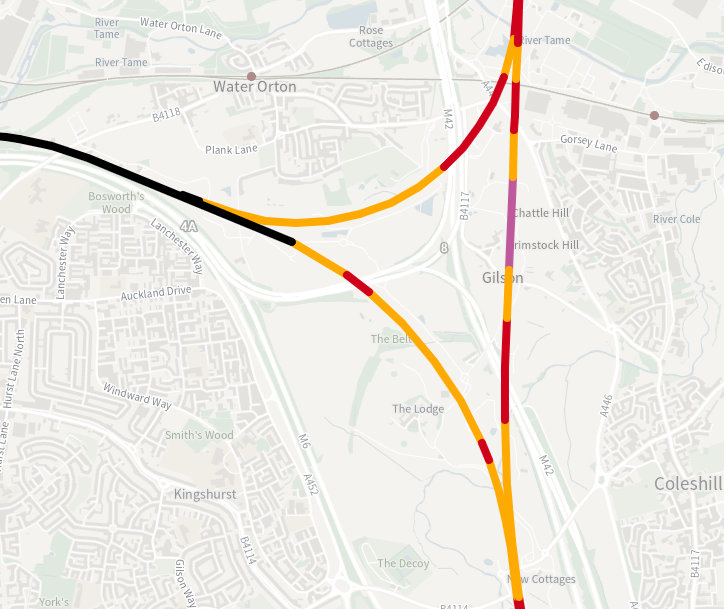
The construction work has been ongoing for years, will take at least a year more, with ongoing motorway restrictions as drivers weave between under-construction bridge pillars. My overall impression of it though? It’s amazing.
Driving past the construction sites, the scale of this project is truly enormous and truly impressive. A whole triangle of high-speed flying junctions, curving over the motorways, concrete viaduct dancing around each other. They are massive but graceful, artful despite their scale. If you drive past at night, the bright lights of the round-the-clock construction sites form their own new constellation, marking out the line of the new railway across the landscape.
Most of Britain’s main line railway construction happened in the thirty years between 1830 and 1860; we had never seen such a fundamental transformation of the landscape before, and arguably never have since. Building HS2 is one of the first things I’ve seen personally, which could be considered comparable, which gives me some sense of the awe that late Georgians and early Victorians must have felt as the railway transformed their landscape. Moreover, I don’t understand how you could look at the HS2 works and not feel something, whether it be awe or fear.
Some of the train nerds who were always against HS2 are still against it, still think it’s a waste of money. I wonder if any of them have seen the building works, though, and still think it shouldn’t be done. The works are so impressive, I don’t see why they’d still have the same opinion. I don’t see how they can.



 Newer posts »